Workflow film · 2:00
All your coding agents. One phone.
Real app recording · Original AI voice and presenter portrait · Captions included · Cuts and playback speed shown in the film. Narration uses Code Overlord’s theatrical English.
Read the transcript
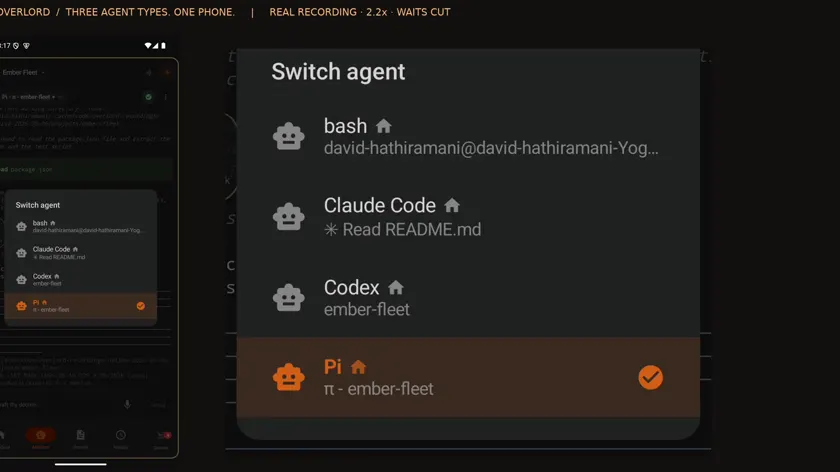
Open the agent switcher on your phone. Claude, Codex and Pi are all running in this workspace. Choose the conversation you want to control.
With Pi selected, type a short file request and press Send. This goes into the actual agent conversation on the desktop.
Pi reads the file and reports the package name. Its live conversation is available here on your phone.
Switch to Claude. Ask a different question, then press Send. The selected agent and its conversation are shown above your message.
Claude reads the project document and replies. Switching agents keeps each request and answer in the right conversation.
Back in Code Overlord on the desktop, select that Claude tab. The phone request and its answer are both here.
Choose Codex from the same phone switcher. Send a request for the page title. There is no need to change mobile apps.
Here Codex asks for permission to read the local file. Open Special and press Enter to approve this request once. The phone sends the key to the selected agent.
Codex continues after approval and reports the title. The request, approval and result stay together in its conversation.
Select Codex on the desktop. The same phone request, one-time approval and completed answer are visible inside Code Overlord.
Switch back to Pi and its phone request is here too. Three different agent types, controlled from one mobile interface, with their work retained on the desktop.
Use the workspace selector to open Ember Council. The header changes to the workspace you selected. Other workspace names have been hidden for privacy.
Open its agent switcher. These are the conversations in Ember Council. The house icon marks agents running locally. Choose your workspace, then your agent, from the same phone interface.