Workflow film · 2:13
Leave a session. Return to the work.
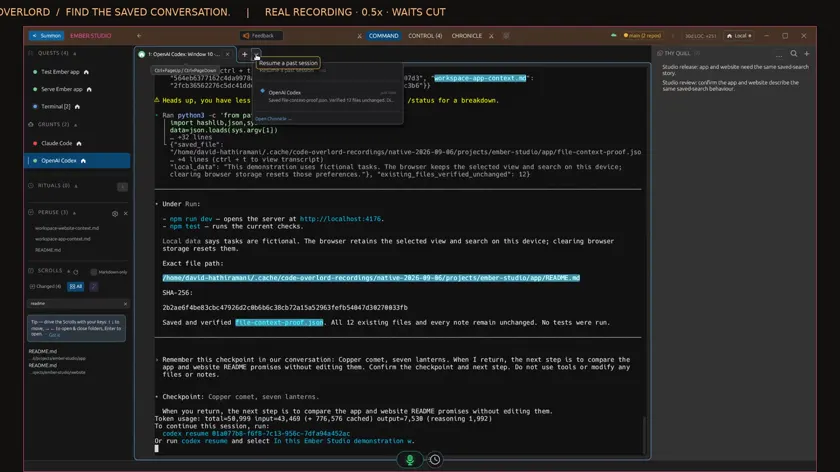
Real app recording · Original AI voice and presenter portrait · Captions included · Cuts and playback speed shown in the film. Narration uses Code Overlord’s theatrical English.
Read the transcript
Before leaving this agent, I put a checkpoint and a next step in the conversation. Copper comet, seven lanterns. When I return, compare the app and website readme promises. The agent confirms both, without changing the files or notes.
The bell opens Notifications. Its newest entry confirms that the agent finished this job. These notices help you spot work needing attention. Return to the relevant terminal to read the actual result.
At the empty Codex prompt, I press Control D to exit normally. The process ends, and its provider conversation is saved. Code Overlord keeps the completed session visible. The saved conversation is what we will resume.
Beside the new-session button, open the Resume caret. The menu shows compatible history for this agent and folder. Check the summary and select the saved conversation. Open Chronicle is available here when you need broader history.
The app opens a new terminal with the earlier conversation restored. Our checkpoint and next step are visible again. Independent process checks confirm that the original process ended and this new launch resumes the same provider conversation.
I ask what checkpoint I left and what we agreed to do next. The instruction asks for conversation memory, with no file reads or tools. The agent recalls the exact phrase and the readme comparison. Now I can continue from that context.
Back in the terminal, I ask it to continue the comparison and preserve the existing work. It reads the two actual readme files and saves a result with the checkpoint, working directory, exact paths and file hashes. The task stays in the app repository.
The comparison finds that the website readme is silent on the app’s behavior promises. Both source files and hashes match the saved result. All existing workspace files and Quill notes are unchanged. The conversation was restored, and the remembered task was completed.