Resume sessions and follow progress
On this page
Return to earlier work and identify the agent that needs your attention.
Before you start
Open the original workspace and choose the relevant agent group. Resuming depends on the provider's saved-session support and valid history metadata.
Follow active work
- Check status dots in the sidebar and session tabs.
- Open the top-toolbar notification bell to inspect pending agent notifications, also called Omens.
- Select the relevant session and read its latest output.
- Reply with the decision or context it needs, or ask for a progress summary.
Summarise what is complete, what is still running and any decision you need from me. Identify the relevant files and checks.
Resume earlier work
Before leaving, put a short checkpoint and the intended next step in the agent conversation. Let its current work finish, then use the provider's normal exit action. In the recorded Codex session, Ctrl+D at the empty prompt ends the process and preserves its provider conversation.
- Choose the original agent group and working directory.
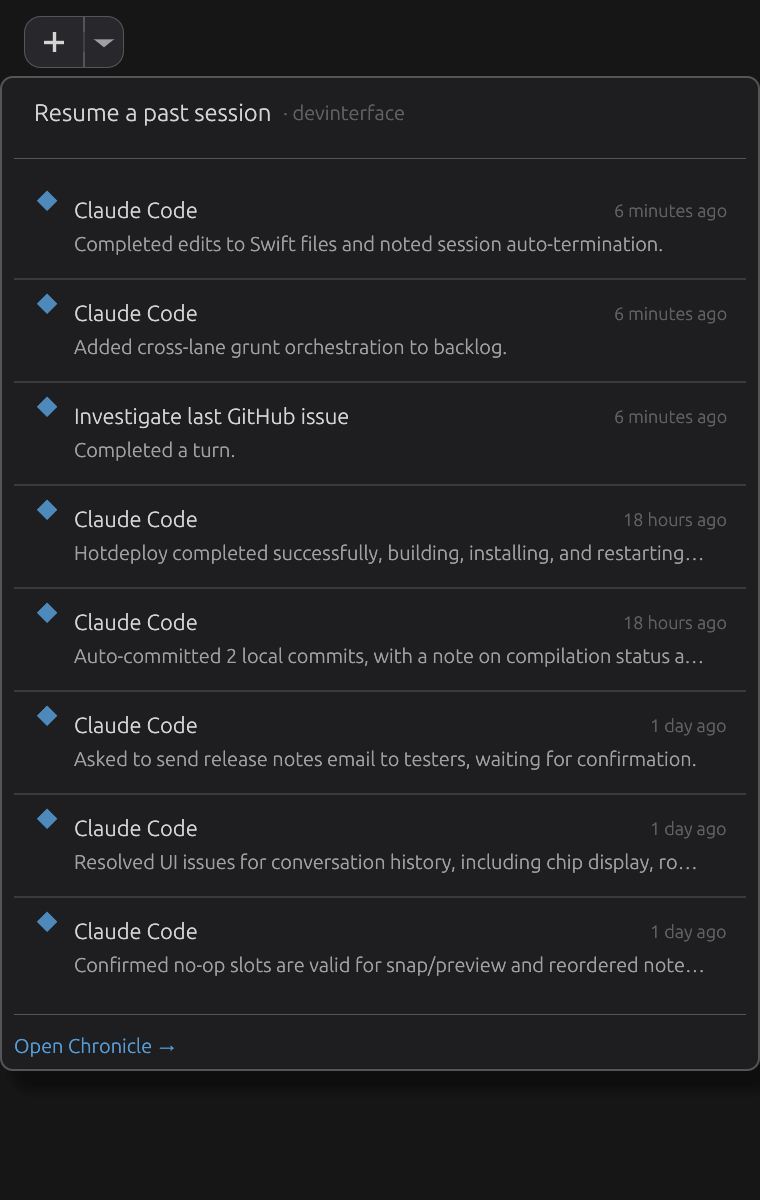
- Open the caret next to the new-session
+button. - Select a compatible session from the Resume menu. Check its title, age, folder and summary.
- If the short list is insufficient, use Open Chronicle for broader history.
- Ask the resumed agent to summarise its context before continuing the task.
Check the result
Confirm that the resumed agent is working in the expected repository and recognises the previous task. If history is missing or incompatible, launch a new session and supply the previous report or saved notes as context.
What resume means
Reattaching to a still-running process and resuming a provider's saved conversation are different operations. Do not assume every terminal's complete scrollback survives a restart. Closing or dismissing a session can also have different effects from stopping its process; read the action presented by the app.
Phone controls depend on the mobile platform and host connection. Use the desktop resume route when the companion reports that resume is unavailable.
The recorded example
In Ember Studio, the agent confirms the checkpoint Copper comet, seven lanterns and a next step: compare the app and website README promises. The video shows its completion notification, normal exit and the matching entry in the Resume menu. Selecting that entry launches a new agent process in the same app repository with the original provider conversation restored.
The first instruction after resuming checks conversation memory:
From our conversation alone, what checkpoint phrase did I leave and what is the agreed next step? Do not read files or use tools, and do not perform the next step yet.
The resumed agent recalls both correctly. It then receives a separate instruction to continue the comparison, preserve the files and notes, and save its result. It reads the two actual README files and reports that the website README is silent on the app's behavior promises. The saved result includes both exact paths and file hashes. All 18 pre-existing workspace files and both Quill notes remain unchanged. This verifies conversation restoration and a resumed task; it does not claim that the README files prove the application's implementation.
More detail
Toolbar and Resume Menu · Session management · Mobile sessions