Workflows: How A Workspace Works
On this page
A workflow is a ready-made way of working that a workspace can choose. It decides how a task on your board moves from "please build this" to "this is checked and ready for you to try": the steps a task goes through, what has to be true before it moves on, and which extra helpers join your team.
Workflows are chosen per workspace. The workspace where you build software can run a full development workflow while a marketing or operations workspace runs none, and nothing one installs reaches the other.
Two Tongues: Code Overlord's themed names, in plain words. Thy Quill is your task board. A row is one task on it. The Dark Lord is the lead agent that dispatches work across the whole workspace, and a Task Lord reports on one task. A minion is an agent with a saved role. The Armoury is Settings.
What A Workflow Gives You
Today the app ships one workflow, The Dark Lord's Ultimate Development Workflow (version 1). Choosing it does three things:
| It adds | What that means for you |
|---|---|
| The Test Warden | A new minion that owns every test in the workspace. Coding agents don't run tests; the Test Warden runs the full test pass once their code has landed, groups what fails, and starts workers to fix each group. It reports and never moves a row itself. |
| Three phases: Build, Green, QA | Every task walks the same three steps, each with its own gate, so a task can't look finished before it has been tested and checked. |
| The board's laws | Thy Quill's laws (the rules your agents follow for the board) are set to this workflow's version, naming the phases, who may move a row and on what evidence. |
The Dark Lord and the Task Lord are part of every workspace, with or without a workflow. A workflow never defines or removes them.
The Three Phases
| Phase | Where the row sits | Who works it | Gate: it moves on when |
|---|---|---|---|
| Build | 🟣 Pending coding | One coding agent per row | Its code is on main and compiles. No test pass is asked for yet. |
| Green | Still 🟣 Pending coding | The Test Warden, plus the fix workers it starts | Every test passes for the areas the row touches, on a test run the Test Warden read itself. |
| QA | 🧪 New commits to QA | One QA worker per row, on an isolated test machine | A coverage record on the row names each acceptance criterion, how it was checked, and the result. |
When QA passes, the row moves to 🎬 QA'd items. It hasn't shipped: only you complete or clear a row, after you have tried it yourself.
flowchart LR
    P["🟣 Pending coding<br/>Build: it compiles"] --> G["🟣 Pending coding<br/>Green: every test passes"]
    G --> Q["🧪 New commits to QA<br/>QA: evidence recorded"]
    Q --> D["🎬 QA'd items<br/>ready for you to try"]
How A Row Moves
- You start the work by dragging a row into 🟣 Pending coding. That drag is the board's only "start work" signal; nothing automatic happens to rows in 🔮 Future or 🟠 Backlog.
- The Dark Lord dispatches a coding agent for the row, and tells it which phase the row is in and which gate applies. The phase decides the gate, so an agent can't skip ahead by saying it is done.
- Each worker ends with a request, not a move. When its evidence is ready it finishes its report with
READY TO MOVE: <key> to <bucket>. The Dark Lord checks that evidence and moves the row. - A row never skips a phase. 🟣 → 🧪 needs Green, and 🧪 → 🎬 needs QA. A failed check or missing evidence leaves the row where it is.
- You can move any row at any time yourself, and only you complete one.
Each row's own Task Lord (the Task Lord tab on a task's page, see A Task's Tabs) can tell you where that task stands: ask it in its Chat.
Choosing A Workflow
The choice lives on one card at the top of an existing Armoury page. There is no separate workflow screen.
- Open the Armoury: the gear at the top right, then Armoury, or press Ctrl+,.
- In the left list, under WORKSPACE, choose Environment Variables. The page opens titled Environment Scrolls.
- The first card on the page is HOW THIS WORKSPACE WORKS. Its box shows what this workspace runs now: No workflow, or the package's name and version.
- Open the box and pick The Dark Lord's Ultimate Development Workflow, version 1. Picking it changes nothing yet: it opens a short review over the Armoury.
- See your team work. One example task walks through Build, Green and QA: who starts it (you), who builds, tests and records evidence, who checks that evidence, and where it waits for you. When work stops explains that a failed check stays with the team, and a decision only you can make comes back to you.
- Review workspace changes. The review lists exactly what changes here: the helper it adds (or the one you already have that it keeps), the phases, and that Thy Quill's laws are replaced (your previous laws are saved). It says how many tasks have an agent working or waiting now; they keep their previous workflow. Who will run it shows each helper's and phase's agent next to this workspace's System Grunt.
- Confirm. A short receipt repeats the workspace, the version and every change. Use this workflow applies it once. Back returns a step with your place kept; Close, Escape or a click outside cancel and leave the workspace as it was.
You choose what starts. Your team builds, tests and records evidence. You decide when it is finished.
When the review says "Needs review". The review won't let you apply a choice it can't reconcile with this workspace. Two conflicts are checked: Thy Quill's laws naming a different mover than the package (for example your laws say each task's Task Lord moves its row, and the package says the Dark Lord does), and the package naming an agent other than this workspace's System Grunt for its helper or a phase. Each says what to change first: edit the laws, change the System Grunt, or use a package version that matches.
After you confirm the card reads This workspace now uses [workflow], version [version]. and Your tasks, evidence and history are still here. If something failed partway it says We couldn't confirm every change. Check this workspace's setup before applying again., with what the workspace file says now; it never claims nothing changed when it can't prove it.
Choosing on the phone isn't offered: choose on desktop, and follow the work from your phone.
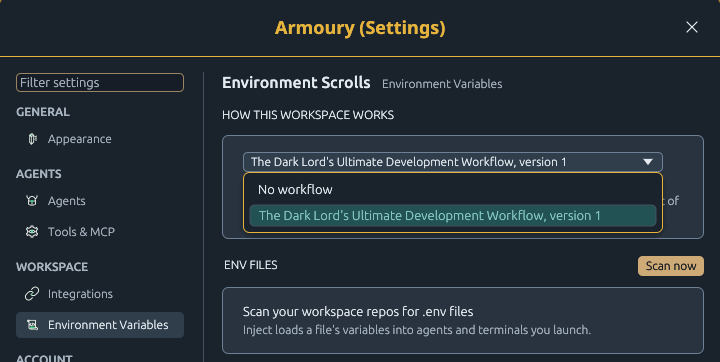 Armoury › Environment Variables (titled Environment Scrolls): the workflow card comes first. Open its box to choose; hover an entry to read its one-line summary. Picking an entry opens the review.
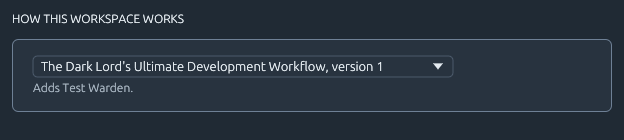 After you choose, the box shows the workflow and its version, and "Adds Test Warden." names the helper it brought.
What The Card Tells You
| You see | It means |
|---|---|
| No workflow and Installs nothing. The laws stay as they are and the core roles stay. | This workspace runs no workflow. The Dark Lord and Task Lords still work as usual. |
| The package's name and version, and Adds Test Warden. | The workflow is installed, with the helper it added. |
| Thy Quill's laws differ from this package's. Your edit stays yours, and it isn't part of the package. | You (or an agent) edited the board's laws by hand. The edit is kept and shown as yours; it is never folded into the package silently. |
| Version 2 is available. Choose it above to review it; work in flight stays on the version it started on. | A newer version exists. Nothing upgrades on its own: pick it when you want it, and the same review shows both versions. |
| Workflow setup can't be read | The workspace's workflow record is damaged or from a newer app, so it runs with no workflow for now. This is not the same as choosing No workflow. Your work is untouched; check the record in the workspace file before choosing again. |
Switching Or Removing
Pick No workflow to remove it, or another version to change. Both open the same review first. No work is lost either way: tasks, rows, evidence and history all stay. Only the extra helper (the Test Warden) and the board's laws change: removal takes out only the helper the workflow added (a Test Warden you already had stays), and restores the laws from before the workflow unless you edited them since. Work already under way finishes on the version it started on. Removing a workflow doesn't stop any agent that is already working: No workflow is selected. Your core Lords and workspace laws still apply.
Where Else You See It
Thy Quill's laws. On the board, open the … menu and choose Amend Thy Quill's laws…. With a workflow installed, the window says whose laws these are, or that your copy differs.
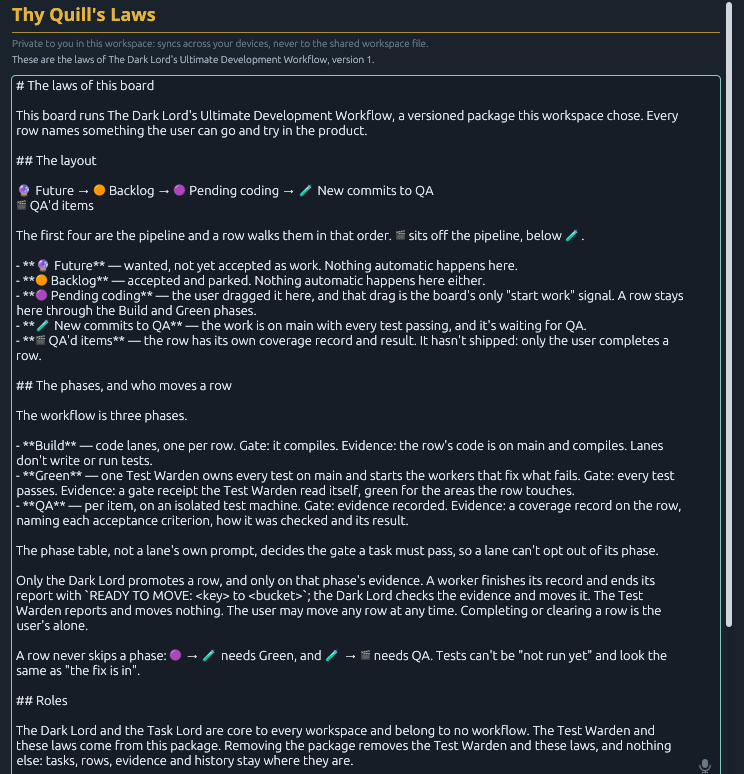 The laws window names the workflow its laws come from. Edit them here if you want; the card above will then say your copy differs.
The roster. While the workflow is installed, the Test Warden joins this workspace's roster of minions, beside the built-in roles. It belongs to this workspace only, never appears in another workspace, and leaves the roster if you choose No workflow.
The Dark Lord's briefing. The Dark Lord is told which workflow is active and which phase each task is in, so it dispatches each row against the right gate.
What Isn't There Yet
- A "Choose how this workspace works" step in workspace setup is designed but not built: it would be a new onboarding step, which waits for sign-off. Use the Armoury card instead.
- Choosing on the phone. The review is desktop only today; follow the work from your phone.
- Rituals and Spells in a workflow. A future package could list the Rituals and Spells it would set up, in the same review. Nothing like that is installed today, and your existing Rituals and Spells are unchanged.
- More packages. Only the development workflow ships today. A package is plain data, so others (for example for a marketing workspace) can be added without a new app build.
A Note On "UX2"
You may see "UX2" in plans and test names. It is not a separate screen or feature. It was the name of a work lane in a UX polish round, titled Conversation, not machinery, and it owned the Chat view of a Lord: your typed words stay in your bubbles, while prompts, automatic [CO] notices and tool details fold into named cards, with the full record still in the Terminal.